|
Can I Assign an Address for a CSL-Based Register from within FastChip? FastChip supports user-assigned addresses for CSL-based functions. There are two methods to assign addresses from FastChip.
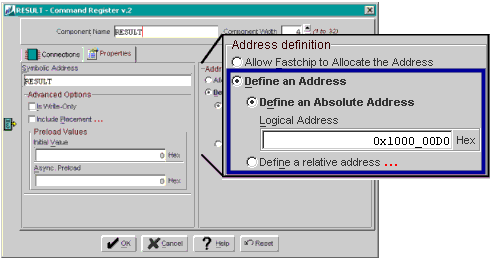
You can also assign addresses from inside your logic design package, such as schematic capture or logic synthesis, although this is not described in this support article. Within a Soft IP ModuleFor some modules like a Command Register or Status Register, you can specify the address directly in the graphical interface. In the example shown below, this Command Register function is assigned to address 0x1000_00D0 on an A7 device.
Using the Address Constraints FileFor all modules and even imported functions, you can assign addresses using an address constraints file. The following example uses the MyDesignA7 project shipped with FastChip.
MyDesignA7 is the example project used here. Assume that we want to assign the RESULT Command Register module to address 0x1000_00D0. The underscore character (_) is just for readability and is ignored within FastChip. The syntax for assigning an address in the constraints file is as follows. ADDRESS selectorName @ address ; We know the desired "address" value, 0x1000_00D0, but what about “selectorName". In this case, the "selectorName" is symbolic address assigned to the command register, or "RESULT". Therefore, to assign RESULT to address 0x1000_00D0, add the following line to the end of your address constraints file and save the file.
#define RESULT 0x100000d0 /* size in byte(s) = 1, lane = LANEB0 */ There is additional information on address constraints in the following document. Directory: C:\Triscend\FastChip\Docs\Technical Documents File: FastChip_Constraint_Files.pdf The document is also available online as article #16741, FastChip Constraints Files.
© 2002 by Triscend Corporation. All rights reserved. |
 With
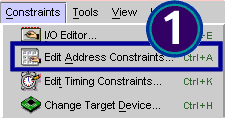
your FastChip project open, invoke the address constraints file by selecting Constraints
With
your FastChip project open, invoke the address constraints file by selecting Constraints
 This
action launches your selected text editor and opens the address contraints
file (*.adc) for the project. The file contains documentation on the various
assignments allowed.
This
action launches your selected text editor and opens the address contraints
file (*.adc) for the project. The file contains documentation on the various
assignments allowed.
 To
generate a header file, click Generate from the FastChip toolbar.
To
generate a header file, click Generate from the FastChip toolbar.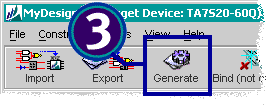
 When
Generate finishes, open the MyDesignA7.h header file created by
FastChip. You will now see that FastChip assigned RESULT as shown below.
Without the constraint, FastChip would have assigned the register to
0x100ffffc.
When
Generate finishes, open the MyDesignA7.h header file created by
FastChip. You will now see that FastChip assigned RESULT as shown below.
Without the constraint, FastChip would have assigned the register to
0x100ffffc.